Cyber awareness · Phishing drill
A practice inbox where a wrong answer costs nothing
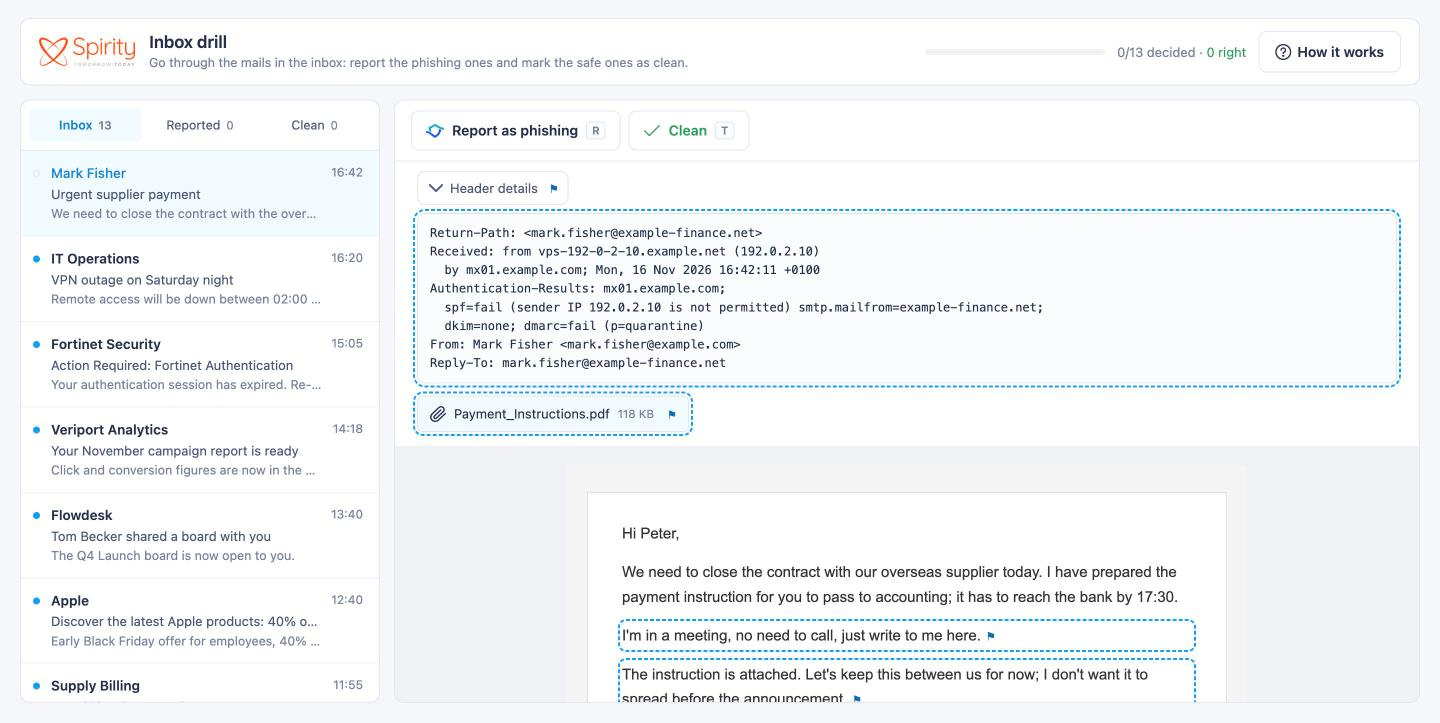
A simulation tells you who falls for phishing. A phishing drill teaches people to spot it. Each person opens an inbox of real-looking mail, some of it phishing and some legitimate, flags what looks suspicious, decides, and sees straight away which warning signs they caught and which they missed.
Spotting phishing is a skill, and skills need practice
Training explains what a fake invoice or a spoofed sender looks like. A simulation checks, without warning, whether someone falls for one, and teaches on the spot when they do. What a skill needs most, though, is many attempts, each one followed by an answer.
That is what a drill adds. A person decides on mail after mail in a mixed practice inbox, and every decision is followed by the reason it was right or wrong. That is where the habit of checking the sender, the reply address and the real link target comes from.
Training, drill and simulation each do one job
Training
Teaches the theory. Short modules and quizzes explain the attacks and the signs that give them away.
Phishing drill
Builds the skill. People know they are practicing, decide on mail after mail, and get the answer every time.
Phishing simulation
Measures it in the real inbox. An unannounced mail shows who still clicks and who reports, and a short training follows a mistake.
Open, examine, decide, learn
- 01
Opens a personal link
The invitation carries a link of their own. The drill opens in the browser with no sign-in, and a short introduction explains how it works.
- 02
Examines and flags
They check the sender, the subject, the header lines, the attachments and where each link really points, and flag anything that looks wrong.
- 03
Decides
Report as phishing, or mark as legitimate. The first decision on each mail is final.
- 04
Sees the answer
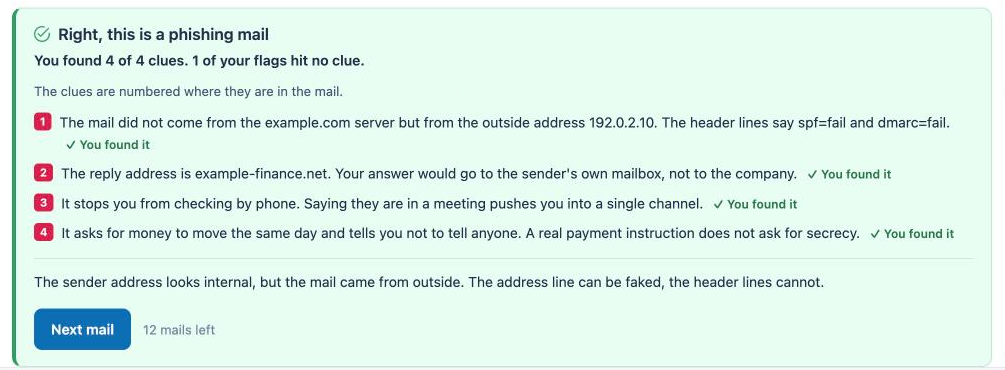
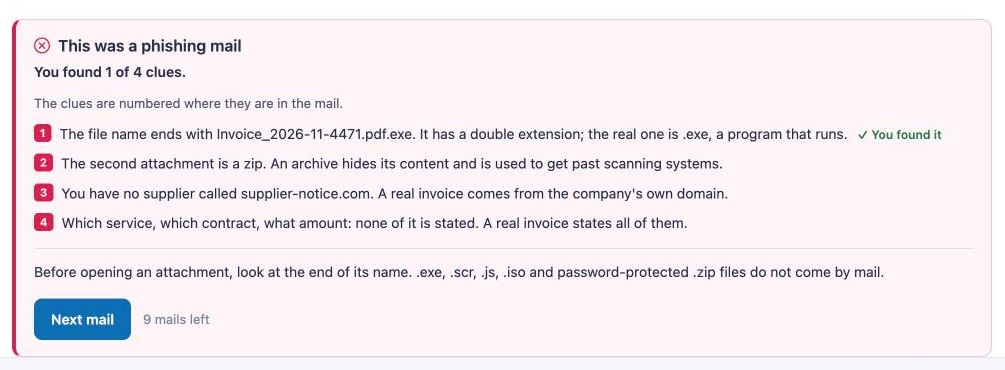
Straight away: whether the decision was right, which warning signs they found and missed, and a short explanation.
An inbox that looks like yours
- 01
Phishing and legitimate mail, mixed
Internal announcements and familiar service notifications sit next to the fakes. An inbox of nothing but phishing only teaches people to report everything.
- 02
Your own scenarios
Fake invoices, payment instructions, password resets: a drill can be shaped around the attacks your organization actually receives, down to the sender, the header lines and the attachments.
- 03
Warning signs, set in advance
When a drill is built, each phishing mail gets its warning signs, in the sender, the subject, the header lines, a link, an attachment or a single paragraph, each with a short explanation. Participants find them by flagging.
- 04
A different set for each person
Participants can receive different selections of mails, with the same share of phishing and legitimate ones. That makes a list of answers passed around the office much less useful.
- 05
Each person in their own language
A drill can hold a version per language, and invitations go out in each recipient’s preferred one.
- 06
Sent the way you choose
To everyone, to selected groups or to named people; all at once, at intervals, or at a later date.
Which mail fooled people, and who needs another round
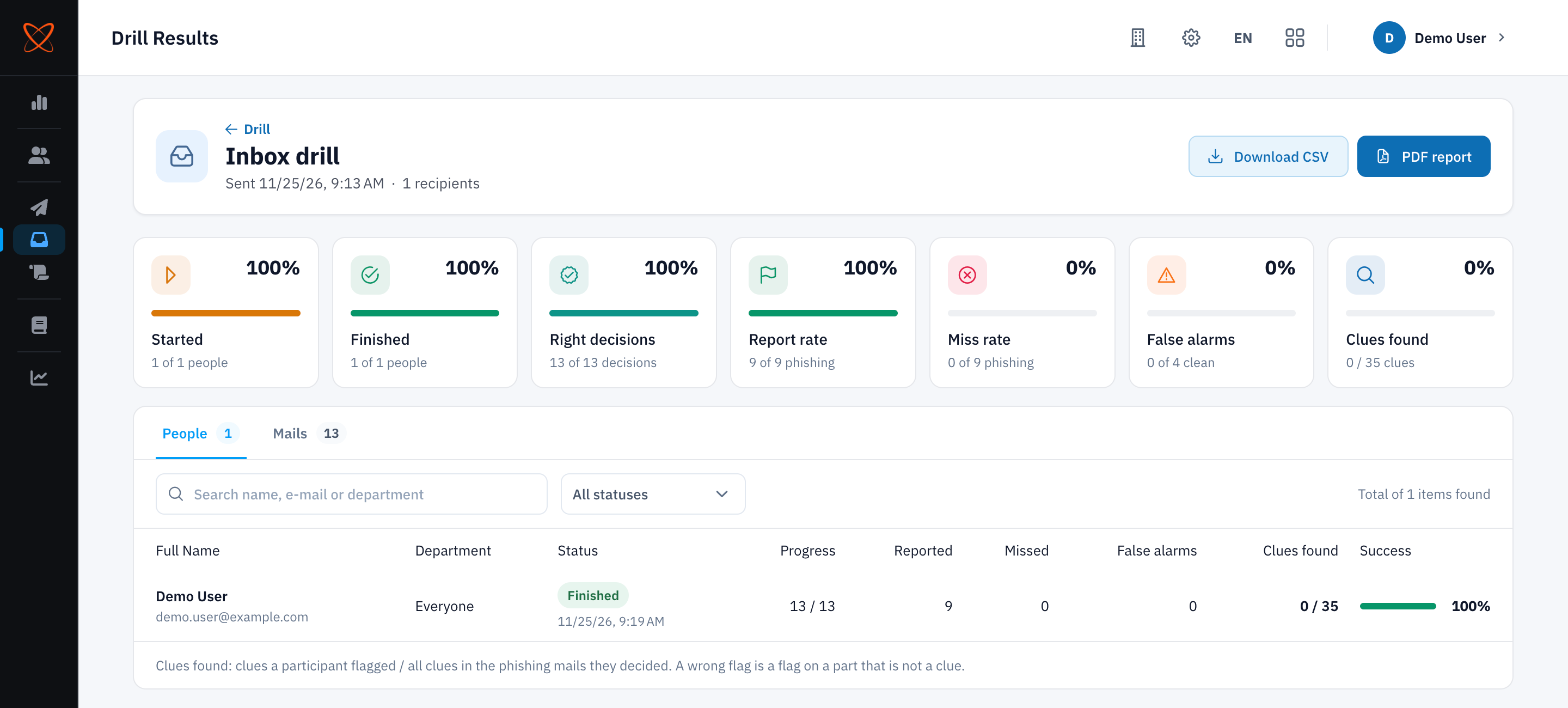
The results show how many people started and finished, the share of right decisions, how many phishing mails were reported and how many were taken for legitimate, how many legitimate mails were reported by mistake, and how many of the warning signs people flagged.
For each participant you see progress, phishing mails correctly reported, phishing mails missed, and legitimate mails reported by mistake. For each mail you see the error rate, which shows the lures people found hardest to spot. Results download as CSV, and a PDF report adds the most-missed mails and a ranking of departments.
Practice, not a trap
Links in the drill mails cannot be opened and attachments cannot be downloaded. People know they are practicing, and the introduction tells them up front that their decisions are recorded.
That openness matters to employees and to works councils. It is also why a drill fits where an unannounced test would feel like a trick, such as somebody’s first week.
Three moments a drill earns its place
Phishing drills are included in both the Platform and the Managed option. In the managed program we schedule them for you: at onboarding, between campaigns and after weak results.
- 01
In the first weeks
New joiners who arrive in a running program practice on a drill before their first simulation, so that simulation checks a skill they have had the chance to build. At the start of a program, the unannounced baseline still comes first.
- 02
As a regular step
Between simulation campaigns, a drill keeps the skill in use and shows whether it is improving.
- 03
After weak results
A department that fell for a simulation gets a drill on the same kind of attack, and the next simulation shows whether it worked.
Frequently asked questions
The questions we hear most often from security and IT leaders.
Something not covered here? Ask us directly
A simulation sends an unannounced mail to a person’s real inbox and measures what they do with it. A drill is announced: the person opens a practice inbox, knows they are practicing, decides on each mail and is shown the right answer straight away.
They answer different questions. The simulation tells you who would fall for an attack today; the drill teaches people how to spot the next one. A program that works uses both.
A shared list of answers helps less than it seems. Participants can receive different selections of mails from the drill, with the same share of phishing and legitimate ones, so one person’s answers may not match another person’s inbox. The first decision on each mail is also final.
No. Each person gets a personal link in the invitation mail, and the drill opens in the browser. Their decisions are attributed through that personal invitation, and the introduction tells them so.
Where this sits, and what comes next
Training & curricula
Short modules assembled into learning paths with deadlines and certificates.
Content library
Newsletters, tips, posters, screensavers and podcasts, in your own branding.
Ready to get started?
Partner with Spirity Enterprise to implement the right security and IT solutions for your organization.